The MAYBESTA Wireless Mini Microphone review comes down to a useful combination: two clip-on transmitters, one Lightning receiver, and a setup designed to start recording without Bluetooth pairing or an app.
It is aimed at creators using compatible Lightning-port phones, but its connector limits who can use the kit.
MAYBESTA Mini Mic Review Summary
The quick verdict
3,000+ ratings
Read Amazon ReviewsMAYBESTA Wireless Mini Microphone
A straightforward two-mic kit for Lightning iPhone users who record interviews, vlogs, or conversations and want a plug-in setup without an app.
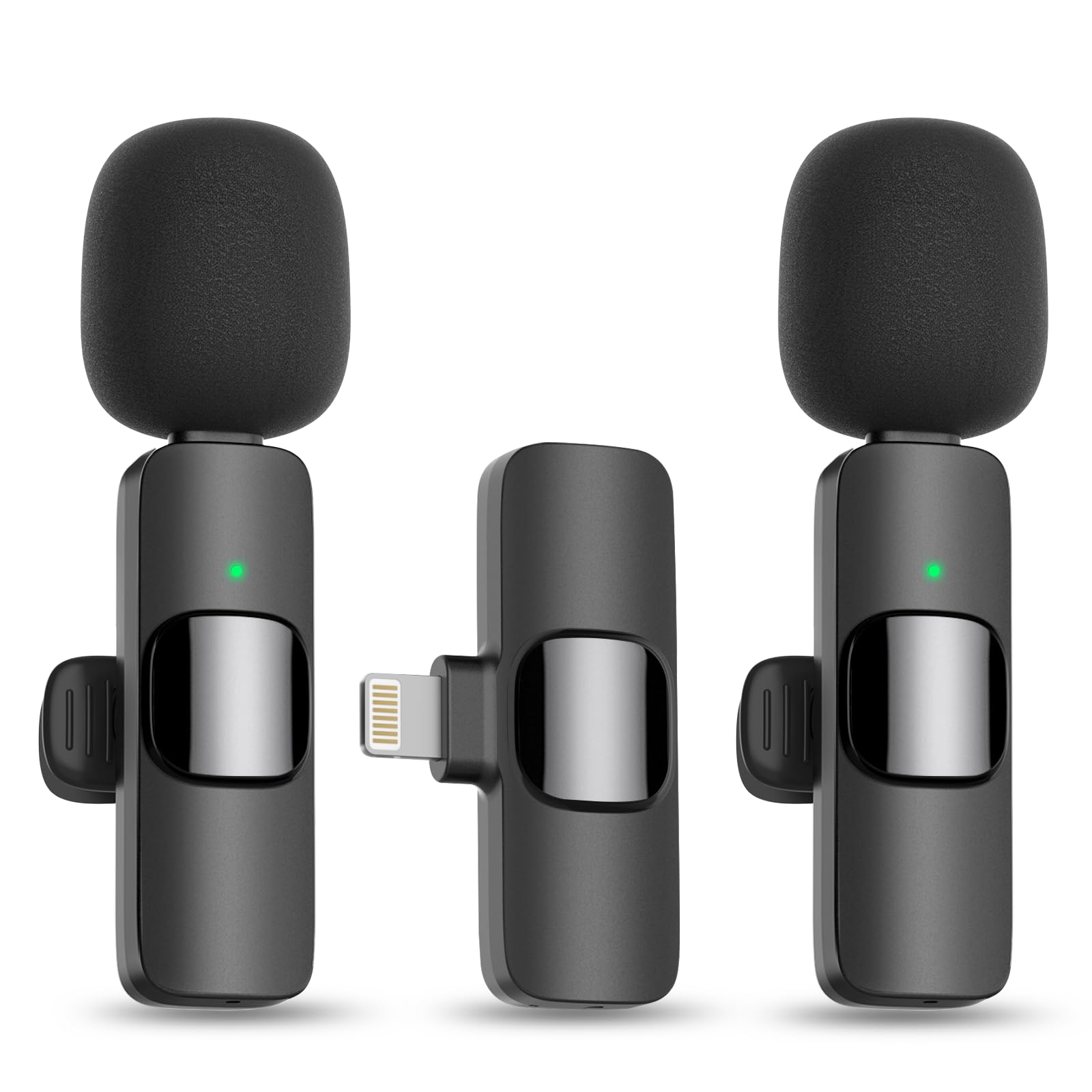
- One Lightning receiver and two clip-on microphones are included for two-person recording or use with a single mic.
- Designed for Lightning-port smartphones; the product description specifically excludes USB-C iPhone 15 and 16 models.
- Plug-in setup: connect the receiver, turn on the microphone, and look for solid green status lights. No adapter, app, or Bluetooth pairing is needed in the described process.
- Omnidirectional pickup is intended to capture sound from different directions around the microphone.

Pros
- Two microphones support interviews and conversations without requiring a second transmitter.
- The Lightning receiver and straightforward startup process keep the described setup simple.
Consider before buying
- The Lightning-only receiver rules out USB-C iPhone 15 and 16 models; check the port on the exact device you plan to record with.
- The up-to-5–6-hour operating time may call for a charging break during a long recording day.
Read the full review summary
This set includes two microphones and one receiver, so two people can be mic'd for an interview or conversation without buying a second transmitter.
The receiver plugs into a Lightning port, and the described setup is to connect it, turn on the microphones, and check for solid green lights before recording.
The feature mix suits occasional interviews, vlogs, live streams, calls, and other phone-based recordings where a compact clip-on mic is more practical than a larger system.
Up to 50–65 feet of wireless transmission and roughly 5–6 hours of continuous use are the stated ceilings; actual results can depend on conditions.
The central buying question is compatibility: this version is for Lightning devices, not USB-C iPhone 15 or 16 models.
The buying factors
MAYBESTA Mini Mic Scorecard
Editorial scores reflect listed features and buyer fit; they are not laboratory measurements or customer ratings.
Two-person recording
Two microphones are included, making it practical to capture both sides of an interview or conversation.
Setup simplicity
The described plug-in connection and green status lights offer a simple start, with no app or Bluetooth pairing process.
Phone compatibility
The Lightning connector works for its intended phone setup, but excludes USB-C iPhone models.
Recording flexibility
The kit can be used with one mic or both, for formats ranging from solo vlogging to two-person interviews.
Wireless reach
A range of up to 50–65 feet gives some room to move, though this is a maximum rather than a guaranteed working distance.
Use between charges
Up to about 5–6 hours of continuous use can cover many recording sessions, but long days may require charging breaks.
Key Features and Specifications of MAYBESTA Mini Mic
- One Lightning receiver and two clip-on microphones are included for two-person recording or use with a single mic.
- Designed for Lightning-port smartphones; the product description specifically excludes USB-C iPhone 15 and 16 models.
- Plug-in setup: connect the receiver, turn on the microphone, and look for solid green status lights. No adapter, app, or Bluetooth pairing is needed in the described process.
- Omnidirectional pickup is intended to capture sound from different directions around the microphone.
- Each mic has a clip and spray-proof foam cover; the feature list also identifies a mute function and battery indicator light.
- Wireless audio transmission is specified up to 50–65 feet, with up to about 5–6 hours of continuous operation after a full charge.
Pros and Cons of MAYBESTA Mini Mic
Pros
- Two microphones support interviews and conversations without requiring a second transmitter.
- The Lightning receiver and straightforward startup process keep the described setup simple.
- A single microphone can also be used for solo videos, calls, or streams.
- The mic clips and included foam covers suit a compact, wearable recording setup.
Consider before buying
- The Lightning-only receiver rules out USB-C iPhone 15 and 16 models; check the port on the exact device you plan to record with.
- The up-to-5–6-hour operating time may call for a charging break during a long recording day.
- The listed wireless range is a maximum, so plan for closer microphone-to-phone distances when a reliable connection matters.
Who Should Buy MAYBESTA Mini Mic?
Good fit
Consider the MAYBESTA Wireless Mini Microphone if you use a compatible Lightning phone and want a small kit for two-person interviews, casual vlogging, or conversations on camera.
Having two mics gives the setup more flexibility than a single-transmitter option: attach one to each speaker, or keep one ready for solo recording.
Its plug-in workflow may also appeal if you want to avoid configuring a recording app or pairing microphones through the phone's Bluetooth menu.
Follow the described startup sequence and switch off the phone's Bluetooth before recording, as the product instructions specify.
This is most compelling for shorter sessions and straightforward phone recording. Treat the stated range and runtime as upper limits when planning a shoot, and make sure your device has a Lightning port before choosing this version.
Who should skip it
Skip this kit if your phone has a USB-C port, including iPhone 15 and 16 models, or if you need a receiver for a camera rather than a Lightning phone.
For all-day recording without charging breaks, compare the runtime and charging arrangements of other systems against your schedule before deciding.
How the MAYBESTA Mini Mic Fits Phone Recording
A two-mic layout for conversations
Two transmitters let the kit cover two speakers at once, which is useful for interviews and co-hosted videos. The ability to use one microphone alone keeps the second available for another person or another session.
For a more polished interview workflow, consider where each mic will clip and whether the speakers can stay within a practical distance of the phone.
Lightning compatibility comes first
The receiver is made for Lightning-port smartphones, so connector fit is the first purchase check.
The description rules out USB-C iPhone 15 and 16 models; if your phone uses another connector, confirm that this exact kit supports it before buying rather than assuming an adapter will work.
What the range and runtime mean in practice
The kit is specified for up to 50–65 feet of wireless transmission and about 5–6 hours of continuous operation after charging.
Those limits may be sufficient for a seated conversation or a modestly mobile shoot, but the upper figures should not be treated as guaranteed results.
Keep the receiver and microphones within a sensible working range and plan a recharge for sessions that approach the stated runtime.
A simple setup with a specific recording routine
The described setup relies on the phone connector and microphone status lights rather than an app or Bluetooth pairing. The instructions also say to turn off the phone's Bluetooth before recording, so build that step into your routine.
Omnidirectional pickup and the included foam covers support a compact clip-on format, though the description does not establish how it will sound in every room or outdoor setting.
Alternatives to MAYBESTA Mini Mic
Battery-focused alternative
1,000+ ratings
Read Amazon ReviewsMAONO Wave T1 Wireless Microphone
Choose the MAYBESTA if two included mics and a simpler Lightning setup match your needs.
Consider the MAONO if you need both connector types or want its charging case and app controls; confirm how many transmitters are included if two-person recording is essential.
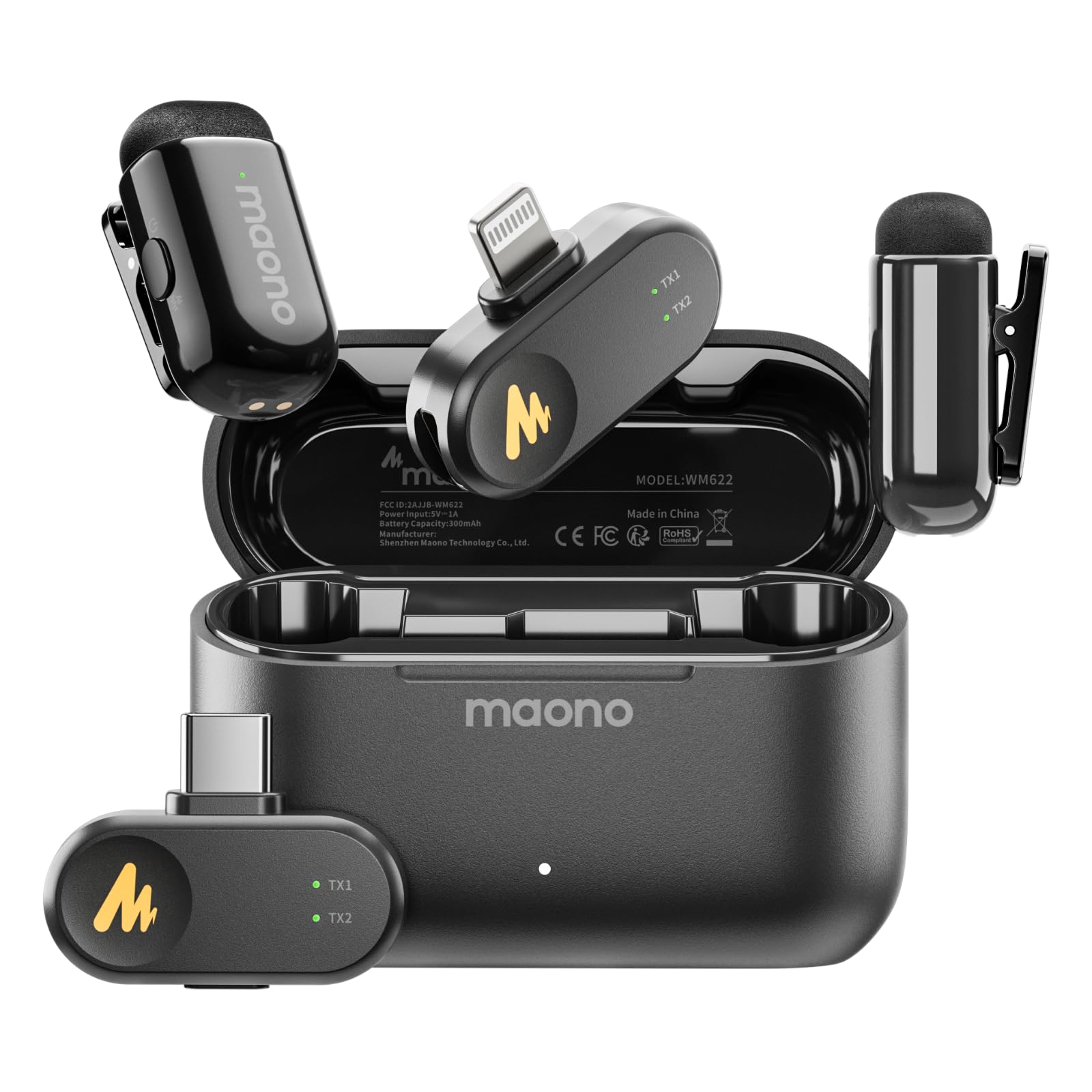
- The MAONO Wave T1 includes Lightning and USB-C receivers, a charging case with up to 30 hours of use, and app-controlled voice filters and noise-reduction settings.
- Its description also lists up to 328 feet of transmission range.
- The MAYBESTA pairs a Lightning-only receiver with two included microphones and is specified for up to about 5–6 hours of operation.
Battery-focused alternative
200+ ratings
Read Amazon ReviewsSmallRig Wireless Mic S70
The MAYBESTA better fits a buyer who records through a Lightning phone and values a simple plug-in arrangement.
Consider the SmallRig if you need its USB-C or 3.5 mm connections, multiple receivers, or the longer stated battery arrangement; check that its supported device connections match your setup.
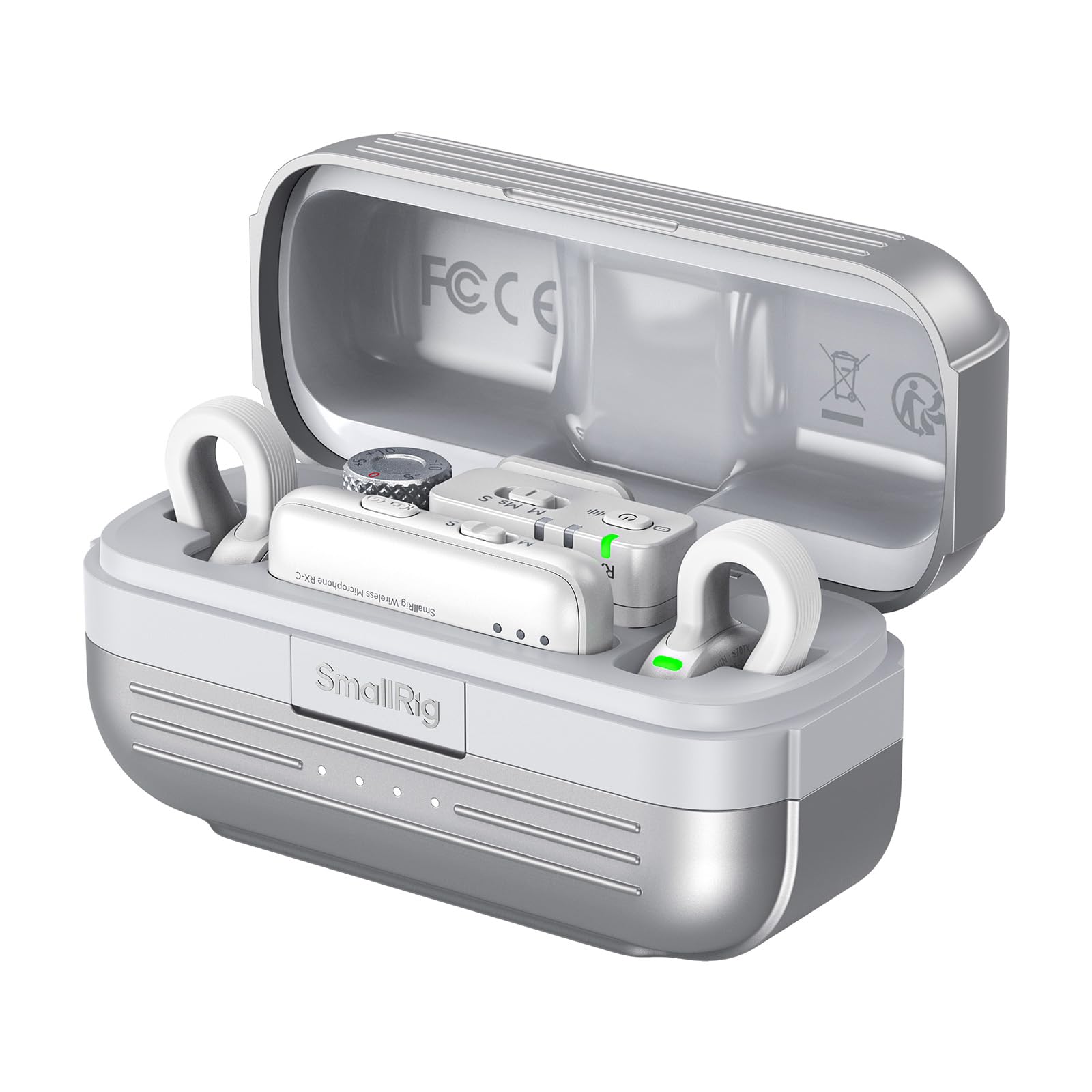
- The SmallRig S70 set includes two transmitters, two receivers, and a charging case.
- Its receiver offers USB-C and 3.5 mm connections, and the description lists up to 8 hours per charge and more than 40 hours with the case.
- The MAYBESTA is a Lightning-phone kit with two clip-on mics and a stated continuous runtime of up to about 5–6 hours.
Is MAYBESTA Mini Mic Worth It?
The MAYBESTA Wireless Mini Microphone is worth considering for Lightning-phone users who want two clip-on mics and a simple way to record interviews, conversations, or solo content. Its clearest strengths are the two-mic arrangement and plug-in setup.
Check your phone's connector first.
The Lightning-only design, approximately 5–6-hour maximum operating time, and range specified as up to 50–65 feet make this a focused option for compatible devices and reasonably planned sessions, rather than a universal microphone kit.
Your review at a glance
3,000+ ratings
Read Amazon ReviewsMAYBESTA Wireless Mini Microphone
A straightforward two-mic kit for Lightning iPhone users who record interviews, vlogs, or conversations and want a plug-in setup without an app.
- One Lightning receiver and two clip-on microphones are included for two-person recording or use with a single mic.
- Designed for Lightning-port smartphones; the product description specifically excludes USB-C iPhone 15 and 16 models.
- Plug-in setup: connect the receiver, turn on the microphone, and look for solid green status lights. No adapter, app, or Bluetooth pairing is needed in the described process.
- Omnidirectional pickup is intended to capture sound from different directions around the microphone.