The FIFINE AmpliGame SC3 puts microphone, line-in, headphone, and line-out level controls within reach, along with voice effects and RGB lighting.
This fifine audio mixer sc3 review looks at who can make the most of its hands-on streaming controls and where its one-microphone setup may feel limiting.
FIFINE SC3 Mixer Review Summary
The quick verdict
4,000+ ratings
Read Amazon ReviewsFIFINE AmpliGame SC3
A compact control hub for streamers who want an XLR mic input, hands-on channel levels, and built-in voice effects.
- One XLR microphone input with built-in 48V phantom power for compatible condenser microphones.
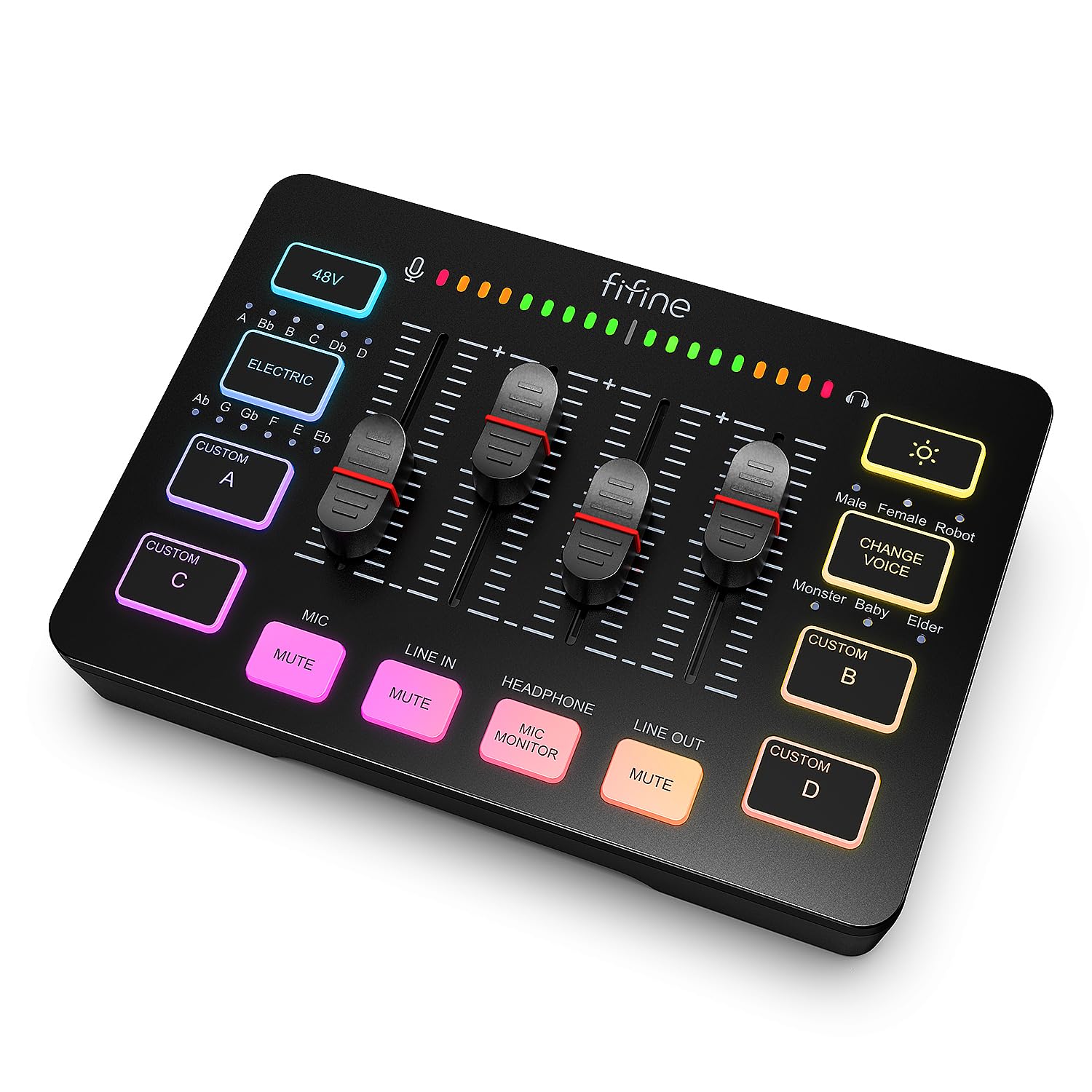
- Four independent level controls for microphone, line-in, headphones, and line-out.
- Front mute and monitor buttons for quick access while streaming or recording.
- Four customizable sound buttons, six voice-changing modes, and 12 auto-tune options.

Pros
- Physical controls make it easier to adjust several audio channels at the mixer.
- The XLR input and 48V phantom power accommodate compatible condenser microphones.
Consider before buying
- The microphone input is for XLR microphones; USB microphones are not supported.
- An XLR cable is not included, so buyers using an XLR microphone should budget for a compatible cable.
Read the full review summary
The SC3 is aimed at creators who want to adjust several audio levels on a physical mixer instead of relying only on software.
Its XLR input, 48V phantom power, front mute and monitor buttons, and separate channel sliders make it a useful fit for a straightforward streaming or recording desk.
Its appeal depends on using the right gear: the microphone connection is XLR, not USB, and the XLR cable is sold separately.
Four customizable sound buttons, voice changing modes, and auto-tune effects add playful options, while the two-input, two-output layout supports a range of computer and auxiliary audio arrangements.
The buying factors
FIFINE SC3 Mixer Scorecard
Editorial scores reflect listed features and buyer fit; they are not laboratory measurements or customer ratings.
Hands-on level control
Separate controls are provided for microphone, line-in, headphone, and line-out levels.
Microphone flexibility
An XLR input and 48V phantom power support compatible microphones, but the mixer is not available for USB microphones.
Live-stream controls
Front mute and monitor buttons offer quick access during a stream or recording.
Built-in effects
Four customizable sound buttons, six voice-changing modes, and 12 auto-tune options give creators several effects to explore.
Connection versatility
The two-input and two-output arrangement includes mic, line-in, headphones, and line-out connections, with USB-C computer connectivity.
Setup simplicity
Plug-and-play compatibility with Windows and Mac is convenient, though buyers need to plan for the separate XLR cable and suitable microphone.
Key Features and Specifications of FIFINE SC3 Mixer
- One XLR microphone input with built-in 48V phantom power for compatible condenser microphones.
- Four independent level controls for microphone, line-in, headphones, and line-out.
- Front mute and monitor buttons for quick access while streaming or recording.
- Four customizable sound buttons, six voice-changing modes, and 12 auto-tune options.
- RGB lighting with flowing or frozen color rotation modes.
- Two input and two output interfaces, including mic, line-in, headphones, and line-out; USB-C connects to a computer.
- Plug-and-play support for Windows and Mac. A 3.5 mm cable can connect a phone or tablet through line-in; the XLR cable is not included.
Pros and Cons of FIFINE SC3 Mixer
Pros
- Physical controls make it easier to adjust several audio channels at the mixer.
- The XLR input and 48V phantom power accommodate compatible condenser microphones.
- Mute and monitor buttons are positioned on the front for convenient reach.
- Built-in sound and voice effects add options for streams, chats, and recordings.
Consider before buying
- The microphone input is for XLR microphones; USB microphones are not supported.
- An XLR cable is not included, so buyers using an XLR microphone should budget for a compatible cable.
- The described setup centers on one microphone, which may not suit a multi-microphone recording arrangement.
Who Should Buy FIFINE SC3 Mixer?
Good fit
Consider the SC3 if you stream or record with one XLR microphone and want physical level controls for your mic, line input, headphones, and output.
The front mute and monitor buttons also suit creators who want quick manual control while speaking or listening.
Its built-in effects may appeal if you use sound cues or voice changes as part of your stream.
Before choosing it, confirm that your microphone uses XLR, that it works with the mixer’s phantom-power setup if needed, and that you have a suitable XLR cable.
Who should skip it
Skip this mixer if your current microphone is USB and you do not plan to switch to an XLR model.
Look for a different setup if you need controls for more than one microphone; the described arrangement is built around a single mic input.
What the FIFINE SC3 Mixer Means for a Streaming Setup
Hands-on adjustments during a stream
Separate sliders for microphone, line-in, headphone, and line-out levels let you make adjustments at the mixer rather than navigating each source in software.
The front mute and monitor buttons fit a workflow where you want those functions readily accessible while talking or checking audio.
Match the microphone before buying
The SC3 has one XLR microphone input and built-in 48V phantom power for compatible condenser microphones. It does not support USB microphones, and the XLR cable is not included.
Check your mic’s connection and power requirements, then choose a suitable cable; cable length, shielding, and connector condition can affect audio quality.
Effects and auxiliary connections
Four customizable sound buttons, six voice-changing modes, and 12 auto-tune options make the mixer more than a set of level controls for creators who want effects in their routine.
A 3.5 mm line-in connection can accept audio from a phone or tablet, while USB-C provides the computer connection.
Alternatives to FIFINE SC3 Mixer
No distinct competing model is recommended here. Compare the connection layout and controls you need before choosing another mixer.
DJ Mixers alternative
4,000+ ratings
Read Amazon ReviewsFIFINE AmpliGame SC3
It does not offer a meaningful feature or buyer-fit difference from the main product, so choosing between these entries should not be based on a different mixer design.
- This candidate has the same model name and matching product description, with the same XLR input, channel controls, buttons, and effects.
- The main product provides an XLR mic input, four separate channel controls, front mute and monitor buttons, and built-in voice effects.
Is FIFINE SC3 Mixer Worth It?
The FIFINE AmpliGame SC3 is worth considering for a streamer or solo creator who uses an XLR microphone and wants physical channel controls, quick mute and monitoring, and accessible voice effects.
Its mix of connections and onboard options is suited to a compact creator setup.
Check microphone compatibility and account for the separate XLR cable before buying. If you rely on a USB mic or need to manage multiple microphones, this design is a poor fit.
Your review at a glance
4,000+ ratings
Read Amazon ReviewsFIFINE AmpliGame SC3
A compact control hub for streamers who want an XLR mic input, hands-on channel levels, and built-in voice effects.
- One XLR microphone input with built-in 48V phantom power for compatible condenser microphones.
- Four independent level controls for microphone, line-in, headphones, and line-out.
- Front mute and monitor buttons for quick access while streaming or recording.
- Four customizable sound buttons, six voice-changing modes, and 12 auto-tune options.